How to Automate Appointment & Service Bookings Using the WhatsApp Business API
WhatsApp Appointment Booking Automation helps businesses manage customer appointments faster and more efficiently. Instead of relying on phone calls, manual messages, or spreadsheets, businesses can use the WhatsApp Business API to let customers check services, choose available dates and time slots, and confirm bookings directly through WhatsApp. Whether you run a salon, clinic, dental practice, gym, repair service, or consultancy, automating your booking process can save time, reduce manual work, and create a smoother customer experience.
The customer waits, finds another salon and books an appointment elsewhere.
Manual appointment management creates unnecessary work: answering repetitive questions, checking available slots, coordinating schedules and confirming bookings.
But what if customers could book appointments directly through WhatsApp, choose their preferred service, select an available time and receive an automatic confirmation?
That's exactly what WhatsApp appointment booking automation makes possible.
With the WhatsApp Business API, businesses can turn everyday WhatsApp conversations into an organised booking experience.
Platforms like Messefy help businesses simplify their WhatsApp customer communication.
1. Why Manual Appointment Booking Is Becoming a Problem
Traditional appointment management usually involves phone calls, WhatsApp messages, notebooks, spreadsheets or a receptionist handling everything manually.
Here are some common problems:
- Missed enquiries: Customers message outside business hours and don't receive immediate responses.
- Repeated conversations: Staff spend time answering questions about services, prices and availability.
- Scheduling conflicts: Two customers may accidentally receive the same appointment time.
- Manual cancellations: Staff must update schedules whenever customers cancel.
- Limited availability: Customers cannot easily book when the business is closed.
For example, a dental clinic in Rajkot might receive multiple appointment enquiries through WhatsApp every day. If every enquiry requires someone to explain available services, check the schedule and confirm a time, the administrative workload quickly increases.
Automation helps remove these repetitive tasks while allowing staff to focus on serving customers.
2. Why WhatsApp Is Ideal for Appointment Booking
Your customers probably already use WhatsApp to communicate with friends, family and businesses.
That makes it a natural channel for appointment management. Customers can simply open WhatsApp and start a conversation.
Benefits of WhatsApp Appointment Booking
- Customer familiarity: Customers already understand how to use WhatsApp.
- 24/7 booking availability: An automated booking flow can accept requests even when your business is closed.
- No additional app: Customers can complete bookings inside WhatsApp.
- Faster communication: Automated replies immediately guide customers through booking.
- Better customer experience: Customers choose services, dates and times at their convenience.
The WhatsApp Business API makes these experiences possible through automated messaging and interactive conversations.
3. WhatsApp Business App vs WhatsApp Business API
Before implementing booking automation, it's important to understand the difference between the regular WhatsApp Business application and the WhatsApp Business API.
| Feature | WhatsApp Business App | WhatsApp Business API |
|---|---|---|
| Basic customer messaging | Yes | Yes |
| Business profile | Yes | Supported through platform setup |
| Greeting messages | Yes | Supported through automation |
| Automated booking flows | Limited | Yes |
| Interactive booking journeys | Limited | Yes |
| Multiple team members | Limited linked-device capabilities | Shared inbox through a platform |
| Automated availability checking | No built-in booking engine | Possible through an integrated booking system |
| Advanced chatbot automation | Limited | Yes |
The regular WhatsApp Business application is suitable for businesses that primarily handle conversations manually.
However, businesses looking to automate bookings, manage multiple conversations and create structured customer journeys should consider the WhatsApp Business API.
The API itself does not provide a complete appointment management system. You need a platform that connects WhatsApp messaging with booking rules and availability management.
4. What Does an Automated WhatsApp Booking Flow Look Like?
A good WhatsApp booking experience should feel like a conversation rather than a complicated online form.
Customers should be able to complete their bookings with just a few taps.
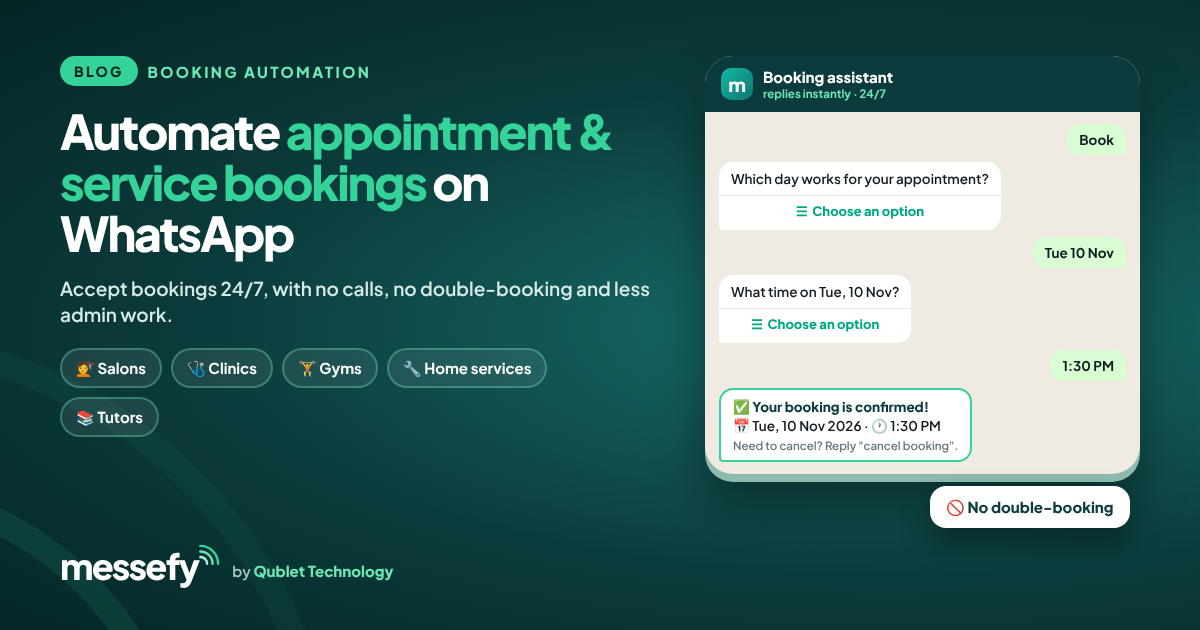
Example: Salon Appointment Booking
A customer sends the word "book" to the salon's WhatsApp number. The automated booking flow starts.
Customer:
Hi, I want to book an appointment.

Salon Bot:
Welcome to ABC Salon!

How can we help you today?

Reply with: book

Customer:
book

Salon Bot:
Welcome! Please select your service:

1. Haircut
2. Hair Spa
3. Hair Colour

Customer:
Haircut

Salon Bot:
Please select your preferred date:

[Monday, 9 Nov]
[Tuesday, 10 Nov]
[Wednesday, 11 Nov]

Customer:
Tuesday, 10 Nov

Salon Bot:
Available appointment times:

[10:00 AM]
[11:00 AM]
[2:00 PM]
[4:30 PM]

Customer:
4:30 PM

Salon Bot:
Please confirm your appointment:

Service: Haircut
Date: 10 November
Time: 4:30 PM
Duration: 30 minutes
Price: ₹300

[Confirm] [Change time] [Cancel]

Customer:
Confirm

Salon Bot:
Your booking is confirmed!

We look forward to seeing you.

Thank you for choosing ABC Salon!
The entire process happens inside WhatsApp. No phone calls, manual availability checks or lengthy conversations are required.
With Messefy, businesses can create this type of guided booking experience using configurable keyword triggers and interactive conversations.
5. How to Set Up WhatsApp Appointment Booking Automation
Implementing an automated booking system doesn't have to be complicated. The important thing is to configure your services, availability rules and customer messages correctly.
Step 1: Connect Your WhatsApp Business Number
Start by connecting your business WhatsApp number through a WhatsApp Business API platform.
This allows your business to communicate with customers through an automated messaging system.
Step 2: Add Your Services Catalogue
Create a list of services customers can book. For every service, configure the service name, duration, optional price and booking capacity.
| Service |
|---|
| Haircut |
| Hair Spa |
| Facial |
| Hair Colour |
Booking capacity determines how many appointments for a particular service can overlap.
Step 3: Configure Business Hours and Availability
Your booking system should understand when your business is available. Configure weekly opening hours, closed days, appointment slot intervals, service durations, minimum booking notice and how many days ahead customers can book.
| Day | Business Hours |
|---|---|
| Monday | 9 AM – 6 PM |
| Tuesday | 9 AM – 6 PM |
| Wednesday | 9 AM – 6 PM |
| Thursday | 9 AM – 6 PM |
| Friday | 9 AM – 6 PM |
| Saturday | 10 AM – 4 PM |
| Sunday | Closed |
The system uses these rules to calculate available appointment slots. When a customer confirms a booking, booked capacity is accounted for and unavailable slots disappear.
Step 4: Customise Welcome and Confirmation Messages
Your automated messages represent your business. Keep them friendly, professional and easy to understand.
Welcome message:
"Welcome to ABC Dental Clinic! We're happy to help you book your next appointment."
Automatic confirmation:
"Your appointment is confirmed! We look forward to seeing you."
Alternatively, if your business wants to review appointments before accepting them, use manual approval.
The customer receives: "Your booking request has been received. Our team will confirm your appointment shortly."
Step 5: Test Your Booking Flow
Before sharing your booking link publicly, test the complete customer journey.
- The booking keyword starts the correct flow.
- Services appear with the correct duration and price.
- Customers can select dates and times.
- Closed days are handled correctly.
- Unavailable slots disappear.
- Confirmations display accurate details.
- Cancellations release appointment slots.
Step 6: Promote Your WhatsApp Booking Entry Points
Once your booking flow is ready, make it easy for customers to find.
- Click-to-chat WhatsApp links.
- A WhatsApp button on your website.
- Social media profiles and posts.
- Your Google Business Profile, where appropriate.
6. Handling Common Booking Problems Automatically
An effective booking system should do more than accept appointments. It should also handle situations that normally require staff intervention.
Scenario 1: Someone Else Books the Same Slot
Imagine two customers select Tuesday at 4:30 PM almost simultaneously. The system must prevent both customers from receiving the same available capacity.
A proper booking flow checks availability again when the customer confirms. If the slot has already been taken, the customer receives a message explaining that the time is no longer available and is offered alternative times.
Scenario 2: A Customer Wants to Cancel
Customers' plans change. Instead of requiring them to call your business, allow them to type:
"cancel booking"
The system cancels their next upcoming appointment and releases the slot. This makes cancellations easier for customers and helps businesses keep their schedules updated.
Scenario 3: A Team Member Takes Over the Conversation
Not every customer interaction should be automated. Some customers may have questions about specific requirements, services or special requests.
Human handoff allows a team member to take over the conversation. When a team member handles a chat, the bot stays out of the way, except when the customer is already in the middle of a booking flow.
Scenario 4: Your Business Is Closed
What happens when customers try to book on Sunday, but your clinic operates only Monday to Saturday?
The booking system should automatically respect your configured weekly opening hours. Closed days are excluded from available appointment options.
7. Best Practices for Successful WhatsApp Booking Automation
Setting up automation is only the beginning. To create a good customer experience, follow these practical recommendations.
- Always obtain customer opt-in: Make sure customers have agreed to receive WhatsApp communications from your business.
- Keep messages short: Avoid sending lengthy paragraphs. Customers should understand what to do immediately.
- Use buttons wherever possible: Tap-to-choose options make booking faster and reduce incorrect responses.
- Allow flexible date and time entry: Supporting entries such as "4:30 pm" makes the experience more convenient.
- Make cancellation simple: Customers should be able to cancel without calling reception.
- Offer human support: Automation should handle repetitive tasks, not prevent customers from speaking to your team.
- Review booking analytics: Monitor booking statuses to understand how your appointment system is performing.
Useful booking statuses include:
- Pending
- Confirmed
- Completed
- Cancelled
- No-show
8. WhatsApp Appointment Automation Use Cases Across Industries
WhatsApp booking automation is useful for almost any business that operates on scheduled appointments.
1. Salons and Beauty Parlours
Customers can book haircuts, facials, hair spas and beauty treatments. Service durations help maintain the daily schedule.
2. Clinics and Dental Practices
Patients can select consultation types, choose available appointment times and receive booking confirmations. Clinics can reduce repetitive scheduling calls.
3. Gyms and Fitness Studios
Customers can book personal training sessions, fitness consultations and other scheduled services. Booking capacity helps businesses manage overlapping sessions where multiple trainers are available.
4. Home Repair and Maintenance Services
Customers can request available service appointments for plumbing, electrical repairs, appliance servicing and maintenance.
5. Consultants and Tutors
Professionals can allow customers or students to select consultation or tutoring sessions based on available dates and times.
Across all these industries, the objective is the same: make booking convenient for customers while reducing administrative work for the business.
9. Why Choose Messefy for WhatsApp Appointment Booking Automation?
Managing appointments through WhatsApp should not require complicated processes or constant manual supervision.
Businesses need a platform that connects customer conversations with practical automation.
Messefy is a WhatsApp Business API customer communication platform designed to help businesses manage conversations and automate customer interactions.
Guided WhatsApp Booking
Customers can start booking by sending a configurable keyword such as "book". They can select services, dates and available times through a guided, tap-to-choose conversation.
Smart Appointment Availability
The platform calculates available slots using business hours, service durations, slot intervals, minimum notice requirements and booking limits.
Flexible Booking Confirmation
Choose between automatic booking confirmation and manual approval. Customisable welcome and confirmation messages help maintain your business's communication style.
Self-Service Cancellation
Customers can reply "cancel booking" to cancel their next upcoming appointment and free the slot.
Shared Team Inbox and Human Handoff
Your team can manage customer conversations through a shared inbox. If a staff member takes over a conversation, the booking chatbot stays out of the way, allowing personal support when needed.
Complete Appointment Lifecycle
Bookings are maintained with statuses such as Pending, Confirmed, Completed, Cancelled and No-show.
Bookings are also associated with the customer's WhatsApp conversation and the source is recorded as WhatsApp. This allows your team to access booking information alongside the customer's conversation history.
More Than Just Appointment Booking
Messefy is part of a wider WhatsApp communication platform that also includes:
- Shared team inbox.
- WhatsApp chatbots.
- Marketing campaigns and broadcasts.
- WhatsApp message templates.
- Mobile application.
Ready to Simplify Your Appointment Management?
Bring appointment booking and WhatsApp customer communication together in one platform Visit Messefy.
10. FAQs
1. Can customers book appointments on WhatsApp without downloading another application?
Yes. Customers can complete the booking process directly inside WhatsApp. They can select services, dates and available appointment times through an interactive conversation.
2. Can WhatsApp automatically confirm appointments?
Yes. An integrated booking system can automatically confirm appointments when customers select an available slot. Alternatively, businesses can enable manual approval.
3. How can WhatsApp booking automation reduce no-shows?
Automated booking confirmations and easy self-service cancellations help customers keep track of their appointments and allow businesses to release cancelled slots.
4. Can I use WhatsApp Business API for my small business?
Yes. The WhatsApp Business API can support appointment-based small businesses, including salons, clinics, gyms, consultants and repair services.
5. Can customers cancel their appointments through WhatsApp?
Yes. An integrated booking system can allow customers to type "cancel booking" to cancel their next upcoming appointment.
Make Your Business Available to Customers 24/7
Explore how WhatsApp automation can simplify your customer communication and appointment management Messefy .