WhatsApp Follow-Up Messages: How to Follow Up With Leads Automatically (2026 Guide)
A customer messages you: "Price?" You reply with the details. Then… silence.
Most of the time, that customer was not saying no. They got busy, forgot, or were comparing two options. The business that follows up first, politely and at the right time, usually wins the sale.
The problem? When you get dozens of enquiries a day, nobody on your team can remember who to follow up with, and when. That is where WhatsApp follow-up messages and drip sequences come in.
In this guide, you will learn how to plan a follow-up sequence, what the WhatsApp rules allow, 10 ready-to-use follow-up templates, and how to make it all run automatically.
Why Follow-Ups Decide Your Sales
Every business owner knows this feeling: you spent money on ads, the enquiry came in, and then the lead went quiet. Without a follow-up, that ad spend is wasted.
- Buyers rarely decide on the first message. They need a reminder, an answer to one more question, or a small push.
- Interest fades fast. A lead that was excited today may have forgotten you by next week.
- Your competitor is one chat away. If you don't follow up, someone else will.
- Manual follow-ups don't scale. Notes, diaries and Excel sheets get missed when the team is busy.
WhatsApp is the best place to follow up because your customers already open it many times a day, and the conversation stays in one thread they can scroll back through.
What Is a WhatsApp Drip Follow-Up?
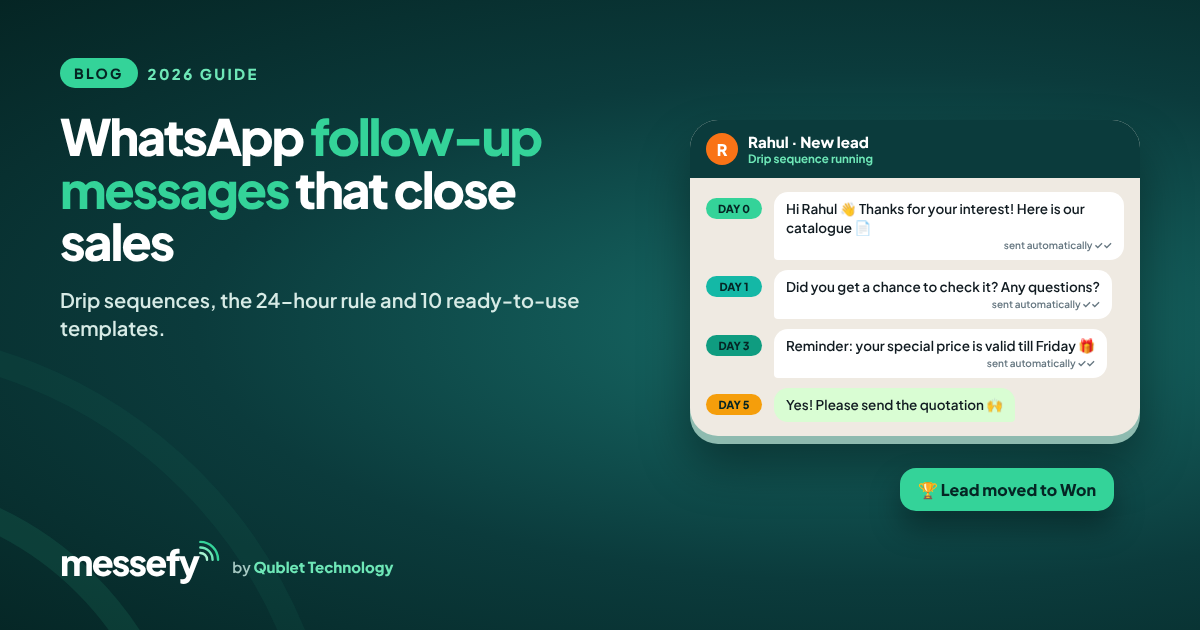
A drip follow-up (or drip sequence) is a series of WhatsApp messages sent automatically to a lead over a few days, on a schedule you set. For example:
| When | Message | Goal |
|---|---|---|
| Day 0 | Thank you + catalogue or price list | Answer the enquiry instantly |
| Day 1 | "Did you get a chance to check it?" | Start a conversation |
| Day 3 | Customer story, offer or FAQ | Remove doubts |
| Day 7 | "Should I keep this for you?" | Create gentle urgency |
| Day 14 | Last check-in with an easy way to say no | Close the loop politely |
The moment the customer replies, the sequence should stop, and a real person from your team takes over the chat.
The WhatsApp 24-Hour Rule (Know This First)
On the official WhatsApp Business API, there are two kinds of messages:
- Inside the 24-hour customer service window: after a customer messages you, you can reply with any normal message for 24 hours. These service replies are free from Meta.
- Outside the 24-hour window: you can only start a conversation with a Meta-approved message template. Since July 2025, Meta charges per template message, and the price depends on the template category (marketing, utility or authentication).
What this means for follow-ups:
- Your Day 0 reply is usually inside the window, so it can be a normal message.
- Follow-ups after a day of silence usually need approved templates. A follow-up that promotes an offer is a marketing template.
- Send marketing follow-ups only to people who opted in to hear from you, and always give them an easy way to stop.
Want the full picture of how the API works? Read WhatsApp Business App vs WhatsApp Business API.
10 WhatsApp Follow-Up Message Templates (Copy and Use)
Replace the words in {curly brackets} with your own details. In Messefy, these become variables that fill in automatically for each customer.
1. Right after an enquiry
Hi {Name} 👋 Thanks for your interest in {Product}! Here is our catalogue with prices. Tell me what you're looking for, and I'll suggest the best option for you.
2. The next day
Hi {Name}, did you get a chance to check the catalogue? If you have any questions about price, size or delivery, just reply here 🙂
3. After sending a quotation
Hi {Name}, just checking if you had a chance to review quotation {Quote No}. Happy to adjust quantities or answer any questions.
4. After a demo or meeting
Hi {Name}, thank you for your time today! As discussed, here is a quick summary: {Summary}. Shall we go ahead with the next step?
5. Gentle offer reminder
Hi {Name}, a quick reminder that your special price of {Price} is valid till {Date}. Reply YES and I'll book it for you 🎁
6. Re-engaging a cold lead
Hi {Name}, it's been a while! We've added {New thing} since we last spoke. Would you like me to send the details?
7. Appointment reminder
Hi {Name}, this is a reminder of your appointment on {Date} at {Time}. Reply 1 to confirm or 2 to reschedule.
8. Payment reminder
Hi {Name}, a friendly reminder that invoice {Invoice No} for {Amount} is due on {Date}. You can pay using the details on the invoice. Thank you!
9. Feedback after purchase
Hi {Name}, we hope you're enjoying your {Product}! Could you rate your experience from 1 to 5? Your feedback helps us improve 🙏
10. The polite last message
Hi {Name}, I don't want to disturb you, so this will be my last message about {Product}. If you need anything later, just reply here and we'll be happy to help.
Tip: templates 7 and 8 are about something the customer already has (an appointment, an invoice), so they can usually be approved as utility templates. Templates with offers or promotions are marketing templates.
7 Rules for Follow-Ups That Don't Annoy Customers
- Stop the sequence when they reply. Nothing feels more robotic than an automatic message after the customer has already answered.
- Space them out. Day 1, 3, 7 and 14 works far better than a message every day.
- Personalise. Use their name and what they asked about, not "Dear customer".
- Give value in every message. An answer, a photo, a review or an offer, not just "any update?"
- Send at sensible times. Business hours, not 11 PM.
- Make it easy to say no. Add a "Not interested" or "Stop" button. It protects your number's quality rating.
- Track results. See which message gets the most replies and improve the rest.
How to Automate WhatsApp Follow-Ups With Messefy
Messefy is the WhatsApp Business API platform by Qublet Technology. With drip follow-ups, your leads are nurtured on a timer, automatically, while your team focuses on the customers who reply.
- Connect your WhatsApp number to Messefy through Meta's official WhatsApp Business API.
- Create your follow-up templates and submit them to Meta for approval, right from the Templates section.
- Build your drip sequence: choose the messages and the delay between them (for example Day 1, Day 3, Day 7).
- Add leads to the sequence from your CRM, including leads from Facebook, Instagram and IndiaMART.
- Let it run. Messefy sends each message on time and automatically retries messages that were blocked.
- Move leads through your pipeline (New → Qualified → Won) as they reply, and see every conversation in your shared team inbox.
Drip follow-ups are included in the Growth plan (₹9,999/year + GST), along with chatbot flows and the sales dashboard. Want replies to be instant too? Read how to automate customer support using WhatsApp API.
Frequently Asked Questions
How many follow-up messages should I send on WhatsApp?
Three to five follow-ups over about two weeks is a good rule. Stop as soon as the customer replies or says they are not interested.
Can I send follow-ups from the normal WhatsApp Business app?
You can send them one by one, but the app cannot schedule a sequence for hundreds of leads. For automatic drip follow-ups, you need the WhatsApp Business API with a platform like Messefy.
Do I need customer permission to send follow-ups?
Yes. Send marketing messages only to customers who have agreed to hear from you on WhatsApp, and give them an easy way to opt out.
Do follow-up messages cost money?
Replies inside the 24-hour customer service window are free from Meta. Template messages sent outside the window are charged by Meta per message, depending on the category.
What is the best time to send a follow-up?
During business hours, when your customer is likely to be free, such as mid-morning or early evening. Test a few times and keep what gets the most replies.
Never Lose a Lead Again
Every enquiry you don't follow up on is a sale handed to someone else. Set up your WhatsApp follow-ups once, and let them work for you every day.
Create your Messefy workspace and set up your first drip sequence, or see all features on messefy.com.
Want a free demo? WhatsApp us at +91 74055 90190 and just send "Hi".